AMPLIFY™ Marketing Platform
Get your Free Business Report
Arm your business with valuable insights into your online marketing performance. Use the Free Business Report to highlight gaps in your marketing, and begin to find the optimal solutions to Amplify your online footprint.
How is your business Performing Online?
Fill out the form below to receive your FREE Business Report via Email.
What is an Online Business Report?
The online business report assigns letter grades for your business based on performance in 6 key marketing categories; Business Listings, Reviews, Social Media, Website, Digital Advertising and SEO. This breakdown helps you, the business owner identify your most critical needs. Next discover and find solutions to these needs within the Amplify™ Marketing Platform.
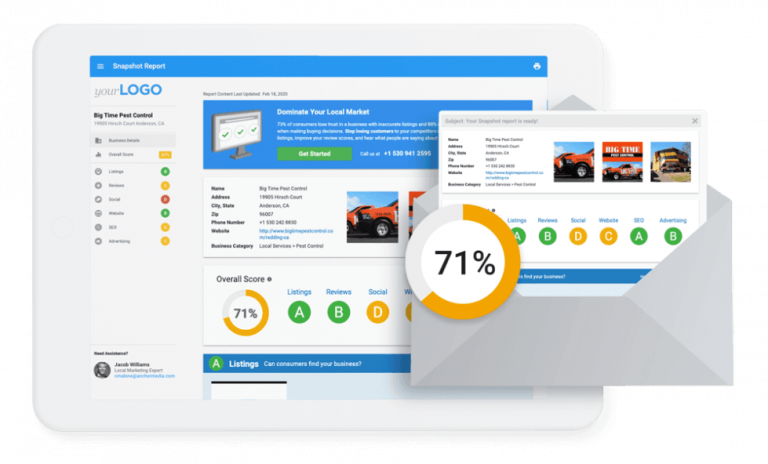
What is on the Business Report?
Business Information
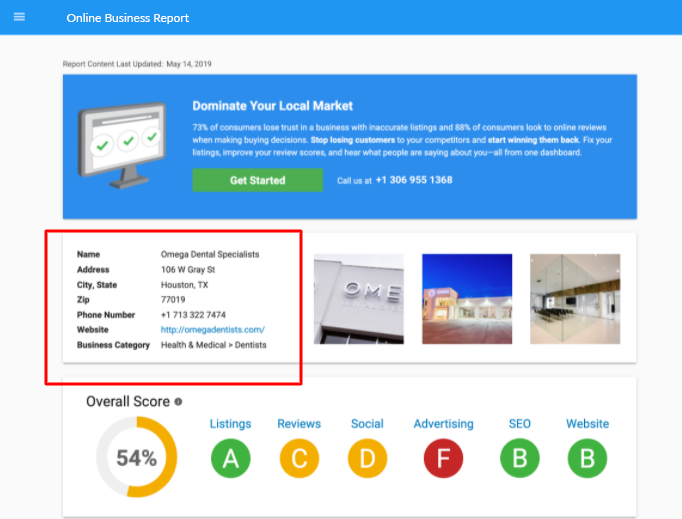
Your business information is displayed at the top of the report. This information is used to search for your digital marketing data and see how they perform within the industry. Please confirm that this information is absolutely correct, the Business name, Address, Phone number, website, and Business category.
Overall Score
The Overall Score indicates how well your digital marketing is performing within the industry. There’s no pass/fail here—a business should strive to be as close to 100% as possible. Each grade is calculated using a percentile grading system, comparing your business to other businesses within your industry.
Business Listings
Local businesses need accurate listings on many directories to ensure that customers can find them online. Improve your search rank and make them discoverable with a strong listing presence. Without online listings, you will lose customers to competitors.
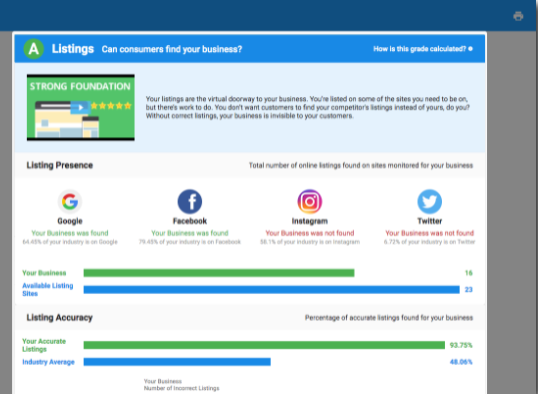
- If the grade is high, it’s important to keep it that way and ensure that your listings remain present online.
- If the grade is low, we can create and distribute listings across major sources. We can even display which listings are missing using the Amplify™ Marketing Platform.
Listing Accuracy
Correct your listings to bring customers into your business. Accurate listings ensure that customers can find and contact a business. Incorrect listings lead to unhappy and frustrated customers. Your business must be listed correctly!
- Green – Accurate: Business listings are healthy! The listings exist (presence), and they are correct (accuracy).
- Yellow – Contains Errors: Although some business listings have been found, they are not accurate. Somewhere and somehow, the wrong information about your business got out and is now being circulated all over the web.
- Red – Not Found: Looks bad, but it’s not as bad as you think! Not being found is better than being found with errors.
Reviews
Boost your online reviews to establish trust and credibility. Reviews are structured mentions that are classified or ranked in some way, often with a star rating or numerical scale. Local businesses must continually collect fresh reviews and strive for 5-star ratings.
- If the grade is high, congratulations on your hard work in earning a solid reputation! Use the Amplify™ Marketing Platform to amplify all that positivity!
- If the grade is low, use Amplify™ to reveal where the negative sentiment is coming from. Positive reviews can easily be displayed on your website, whereas negative reviews can be dealt with privately.
Social Media
Every day, millions of consumers declare their buying intentions on social media. You must keep your followers engaged to grow your audience and build brand loyalty.
- If the grade is high, you are off to a great start! However, managing multiple social networks is difficult and time-consuming. Amplify™ is an easy way to continue to build a social presence and find new leads.
If the grade is low, you can manage customer activity in a single feed, respond to customers straight from the feed, and track every interaction. A social page may not appear in the report for several reasons. It could mean that you do not have a page for your business, maybe because you are using a personal page instead of a business page, or your page has viewing restrictions. Remember, if our system has a hard time finding your social page, your customers will too.
Website
Our Business Report leverages Google PageSpeed Insights to assess whether your website speed meets Google’s expectations on mobile and desktop. The report then displays recommendations for issues to fix.
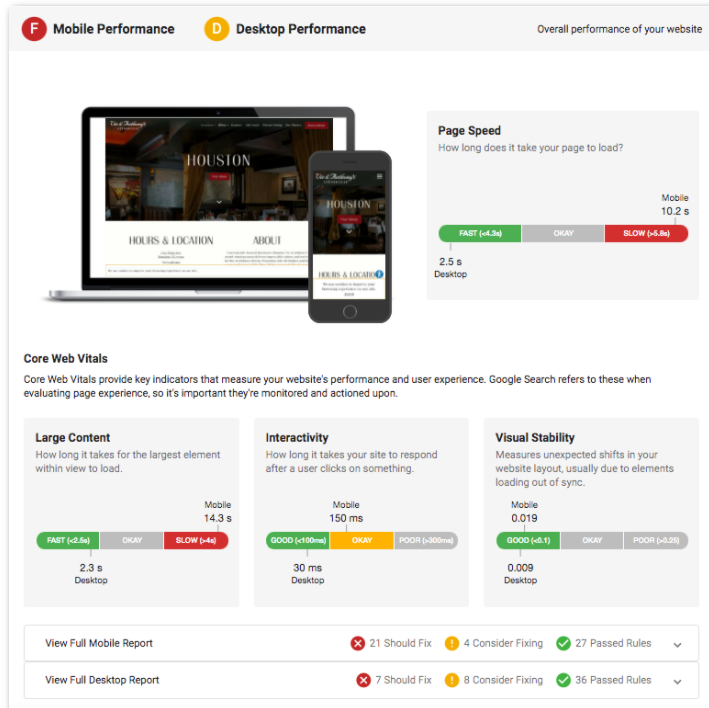
- Should Fix: Rules that failed PageSpeed Insight’s tests. You should fix these immediately.
- Consider Fixing: Rules that passed PageSpeed Insight’s tests, but could use improvement. You might consider fixing these issues, but they’re not necessarily critical.
- Passed Rules: Rules that passed PageSpeed Insight’s tests.
Digital Advertising
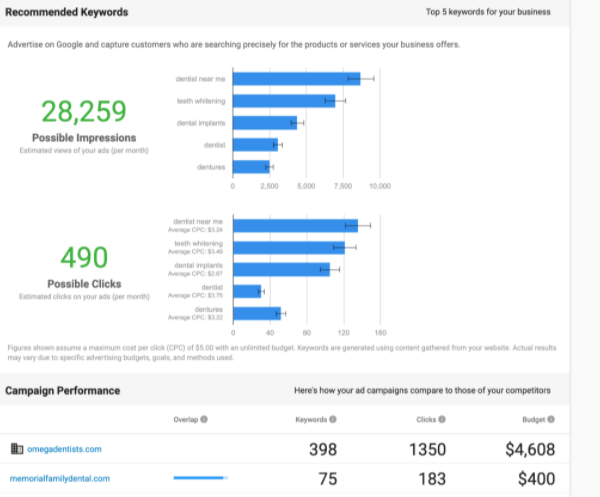
Recommended Keywords
Explore the opportunity. This section of the report identifies the average Cost-Per-Click (CPC) for your top five keywords, based on content gathered from your website and location. The report also displays the potential results of running a dedicated ad campaign over one month that focuses on these keywords.
Campaign Performance
The report examines the number of paid ads you and your competitors have purchased in the most recent month, the estimated number of clicks received from all their paid keywords, and the approximate Google Ads spend in the last month. This data provides you a view of what high-performing competitors are doing, and what you must do to compete.
Search Engine Optimization (SEO)
Improve a website’s ranking in organic (unpaid) search results or search engines like Google and Bing. Your goal with SEO is to rank on the first page for the right keyword search phrases that are relevant to your business. Consumers are using search engines to assess their options and qualify the goods and services they’re interested in. With 81% of consumers performing an online search before making a purchase decision, every business needs to invest in SEO!
Local Search Results
View your search ranking and see how high up they appear in search results. We conduct a search for a high-priority keyword related to your business and display those results directly in your Online Business Report. We display the ranking in two formats, the first being across the local area within Google Maps using 9 dynamic hotspots. The second is the top three search results, along with where the business falls in those results.
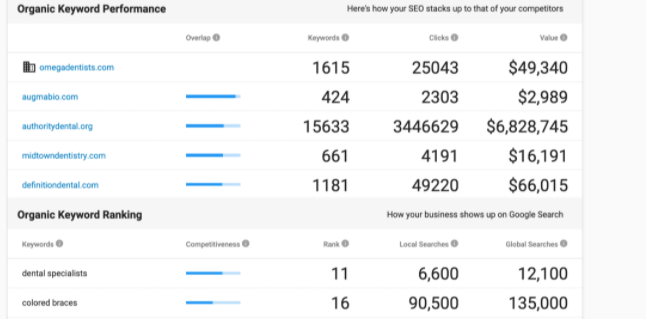
Organic Keyword Performance
Compare your keyword performance against your top competitors. Your business website is scanned for the top keywords in the Business Report’s database, as determined by Google. The report then displays keyword performance for your business and its top competitors.